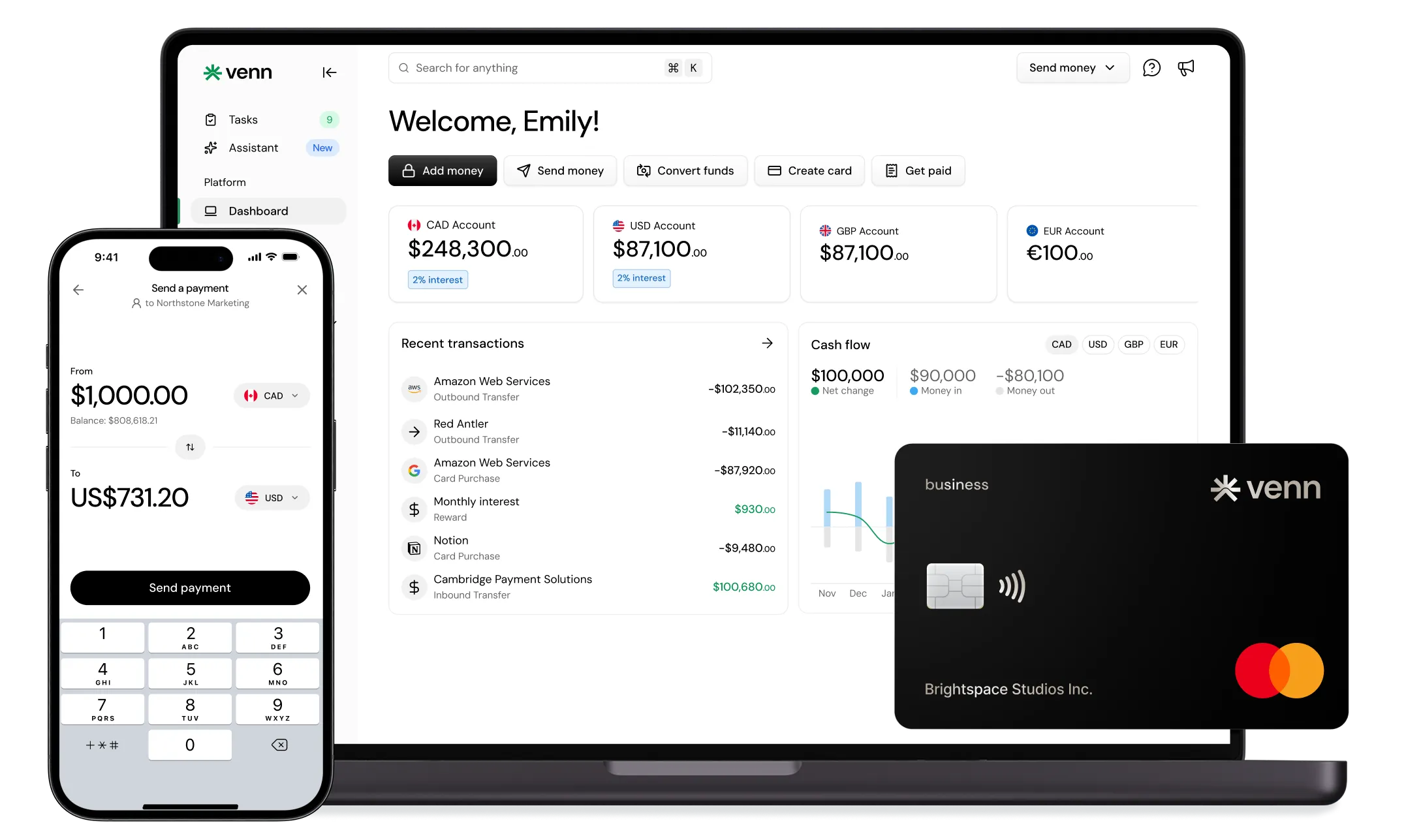
How to open a multi-currency business account online
How to open a multi-currency business account online in Canada: see eligibility, required documents, local rails, and ways to lower FX fees with Venn today.

Ahmed Shafik
Co-founder
.png)

Trusted by 15,000+ Canadian businesses
Business banking for Canada
Local CAD and USD accounts, corporate cards with cashback, the lowest FX rates in Canada, free local transfers, and more.
Running a business that operates across borders means dealing with a frustrating reality: traditional banking wasn't built for the way Canadian companies work today. Your US clients want to pay in USD. Your European supplier invoices in EUR. Your remote contractors expect GBP transfers. And somewhere in between, you're losing money to FX markups, wire fees, and the administrative chaos of juggling multiple accounts across institutions.
Opening a multi-currency business account online solves this. But not all multi-currency accounts deliver the same value. The difference between holding foreign currency and actually accessing local payment rails can mean thousands of dollars in savings annually.
This guide covers exactly what Canadian businesses need to know: eligibility requirements, required documents, step-by-step application process, and what to look for in a platform that serves as the foundation of your financial stack. Venn offers Canadian businesses a comprehensive solution with local CAD, USD, EUR, and GBP accounts, competitive transfer pricing, and direct accounting integrations that eliminate reconciliation headaches.
What "Multi-Currency" Should Mean for a Business
Multi-Currency Balances vs Local Account Details
Holding foreign currency is table stakes. The real question is whether you can send and receive payments through local rails, or whether every transaction routes through expensive international wire networks.
Here's the practical difference: When a US client pays your invoice, they can either send a domestic ACH transfer (fast, cheap, familiar to them) or an international wire (slow, expensive, requires SWIFT codes). If your "USD account" only provides SWIFT details, your client pays wire fees, you wait longer, and the experience feels clunky for everyone involved.
Local account details mean your USD account functions like a US bank account for payment purposes. Your EUR account accepts SEPA transfers. Your GBP account receives Faster Payments. This distinction matters more than most business owners realize until they've experienced both sides.
Local Rails That Matter
Understanding payment rails helps you evaluate any multi-currency platform:
• USD payments: ACH transfers are the standard for US domestic payments. They're low-cost and settle within 1-2 business days. SWIFT wires are reserved for urgent or large transfers.
• CAD payments: EFT handles most business payments. Interac e-Transfer® works for faster, smaller transactions.
• EUR payments: SEPA transfers cover the eurozone with low fees and predictable timing.
• GBP payments: Faster Payments delivers near-instant transfers within the UK banking network.
Venn supports these local rails across CAD, USD, EUR, and GBP accounts, which means your international payments flow through the most efficient channels available.
Why Canadian Businesses Open Multi-Currency Accounts
Professional Services and Agencies
Consulting firms, marketing agencies, and professional service providers with US clients face a common scenario: invoicing in USD, receiving payment, then converting to CAD at unfavorable rates. A multi-currency account lets you hold USD, pay USD-denominated expenses directly, and convert strategically when rates favor you.
Ecommerce and Retail
Online sellers using Shopify, Amazon, or other marketplaces often receive payouts in USD regardless of where customers are located. Meanwhile, supplier payments might span USD, EUR, and CNY. Multi-currency accounts reduce the constant conversion friction that erodes margins on every transaction.
SaaS and Technology Companies
Software companies pricing in USD for the North American market need clean USD receivables. Add international contractors, cloud infrastructure bills in multiple currencies, and conference expenses across time zones, and the case for multi-currency accounts becomes obvious.
Import/Export and Logistics
Frequent international supplier payments require predictable costs and timing. Wire cutoff times, weekend delays, and opaque FX spreads create cash flow uncertainty that multi-currency accounts with transparent pricing eliminate.
Venn serves as the operating system for these flows, combining multi-currency accounts with corporate cards, expense management, and accounting integrations in a single platform.
Why Venn Works as the Foundation for a Multi-Currency Financial Stack
A Single Platform for Accounts, Cards, Transfers, and Controls
Venn provides local CAD, USD, EUR, and GBP accounts with the ability to send transfers to 180 countries in 36+ currencies. Global wires cost $6-$10 depending on your plan. ACH and EFT transfers run $0-$2. Interac e-Transfer® is free and unlimited on all plans.
This consolidation matters because fragmented financial tools create fragmented data. When your accounts, payments, and cards live in one platform, you gain visibility that spreadsheet reconciliation can never match.
Your funds are covered under CDIC insurance protection, providing the security foundation that Canadian businesses require.
Cards and Spend: 1% Unlimited Cashback
The Venn card delivers 1% unlimited cashback on all spend with no caps or category restrictions. But the multi-currency card behavior deserves attention: when you make a purchase in USD while holding USD in your account, the card draws from that balance first. Same for EUR and GBP. This automatic currency matching eliminates unnecessary FX conversions that other cards trigger on every international purchase.
For businesses with regular international spend, whether SaaS subscriptions, travel, or supplier payments, this feature compounds into meaningful savings.
Accounting Automation: QuickBooks and Xero Integration
Closing the books faster isn't about working harder. It's about cleaner data flowing automatically between systems. Venn's direct integrations with QuickBooks and Xero mean transactions categorize correctly, FX adjustments happen automatically, and reconciliation becomes verification rather than detective work.
The pricing model supports this: Venn charges per account, not per user. Your entire finance team can access the platform without per-seat fees eating into your budget as you scale.
Step-by-Step: How to Open a Multi-Currency Business Account Online
Step 1: Confirm Eligibility
Venn supports Canadian corporations and sole proprietorships operating in all provinces except Quebec. You'll need to verify ownership and director information as part of standard KYC/AML compliance requirements.
Step 2: Gather Required Documents
Before starting your application, collect:
• Business registration details (incorporation documents or sole proprietorship registration)
• Government-issued ID for owners and directors
• Business address and operating information
• Shareholder and director information for corporations
Having these ready streamlines the application process significantly.
Step 3: Complete Online Application and Verification
The application flow covers business details, ownership information, and identity verification. Everything happens online without branch visits or paper forms. Most applications complete within minutes, though verification timing varies based on business complexity.
Step 4: Add Currencies and Get Account Details
Once approved, you'll activate the currencies you need and receive local account details for each. Your USD account comes with ACH routing information. Your CAD account includes EFT details. EUR and GBP accounts provide SEPA and Faster Payments details respectively.
Step 5: Connect Tools and Set Up Workflows
Connect your QuickBooks or Xero account immediately. Add your regular payees, configure approval workflows if you have a team, and invite users who need access. Remember, Venn doesn't charge per user, so include everyone who needs visibility.
Step 6: Start Receiving Payments and Paying Vendors
Update your invoices with new banking details for each currency. Configure your marketplace payouts to deposit directly. Set up recurring payments to regular suppliers. The system works best when you route payments through the appropriate rails based on urgency and cost.
Fees, FX, and Real-World Cost Transparency
The Fee Categories That Impact Total Cost
When evaluating any multi-currency platform, examine four cost areas:
• Monthly plan fees: What's included at each tier?
• FX markup/spread: The hidden cost in every conversion
• Transfer fees: ACH/EFT vs wire pricing
• Incoming wire fees: What traditional banks charge to receive international payments
Practical Examples
Receiving $10,000 USD from a US client: With local ACH details, your client sends a domestic transfer at minimal cost. The funds arrive in 1-2 business days. Compare this to receiving via SWIFT wire, where your client pays $25-$50 in outgoing fees, intermediary banks may deduct additional amounts, and you might wait 3-5 days.
Paying a UK supplier £5,000: Using Faster Payments through your GBP account, the transfer costs a few dollars and arrives same-day. A traditional wire involves higher fees on both ends plus potential correspondent bank charges.
Card purchase of €500 while holding EUR: The Venn card draws from your EUR balance directly, avoiding the FX conversion that would otherwise add 2-3% to the transaction cost.
Comparison Snapshot: Venn vs Traditional Banks vs Typical Fintech Options
Implementation Tips: Set Up a Multi-Currency Workflow That Scales
Set Currency Rules for Receivables
Invoice clients in their local currency and receive into the matching account. A US client paying a USD invoice into your USD account eliminates forced conversions. You control when and how much to convert to CAD.
Choose the Right Rail for Each Payment
ACH and EFT work for most regular payments where 1-2 day settlement is acceptable. Reserve wires for urgent transfers or destinations where local rails aren't available. The cost difference compounds quickly across dozens of monthly transactions.
Reduce Month-End Reconciliation Time
Consistent transaction categorization combined with accounting software integration transforms reconciliation from a multi-day project into a verification exercise. The time savings free your team for higher-value work.
Controls for Teams
Set spend policies, require receipt capture, and configure approval workflows that match your organization's needs. These controls prevent expense report surprises and create audit-ready documentation automatically.
Open Online, Then Optimize for Fewer Fees and Less Admin
Opening a multi-currency business account online takes minutes. The real value emerges over months as you route payments through efficient rails, avoid unnecessary FX conversions, and consolidate your financial operations into a coherent system.
Prioritize platforms that offer local account details (not just currency holding), transparent FX pricing, direct accounting integrations, and spend controls that scale with your team. Venn delivers this combination as a comprehensive business banking platform designed for Canadian companies operating globally.
Ready to simplify your international business finances? Sign up for a Venn account today.
FAQ
Q: What is a multi-currency business account?
A: A multi-currency business account allows businesses to hold, send, and receive funds in multiple currencies (such as CAD and USD) from a single account, helping reduce foreign exchange costs and simplify international transactions.
Q: Can I open a multi-currency business account fully online in Canada?
A: Yes. Platforms like Venn allow Canadian corporations and sole proprietorships to complete the entire application process online without branch visits. Verification happens digitally, and most accounts activate within minutes to hours.
Q: What documents do I need to open a multi-currency business account online?
A: Commonly required documents include business registration details, government-issued ID for owners and directors, business address verification, and shareholder or director information for corporations.
Q: How long does approval take?
A: Many applications receive approval within the same business day. More complex business structures may require additional verification, which can extend the timeline by a few business days.
Q: Can I receive USD from US customers via ACH?
A: Yes. Venn provides local USD account details, including ACH routing information, allowing US customers to send domestic ACH transfers instead of international wire transfers.
Q: Can I pay taxes, bills, and payroll from the account?
A: Yes. Venn’s CAD account supports bill payments, tax remittances, and payroll through standard Canadian payment rails, including EFT and bill pay.
Q: Does Venn support QuickBooks and Xero?
A: Yes. Venn integrates directly with both QuickBooks and Xero, enabling automatic transaction syncing and streamlined reconciliation.
Q: Are Interac e-Transfer® transfers free?
A: Yes. Venn offers free, unlimited Interac e-Transfer® transfers on all plans.
Q: Can I open an account if my business is in Quebec?
A: No. Venn currently supports businesses in all Canadian provinces except Quebec.
---
**Disclaimer:** This publication is provided for general information purposes and does not constitute legal, tax or other professional advice from Venn Software Inc or its subsidiaries and its affiliates, and it is not intended as a substitute for obtaining advice from a financial advisor or any other professional. We make no representations, warranties or guarantees, whether expressed or implied, that the content in the publication is accurate, complete or up to date.
This publication is provided for general information purposes only and does not constitute legal, tax, financial, or other professional advice from Venn Software Inc., its subsidiaries, or its affiliates, and is not a substitute for advice from a qualified professional. All comparisons and competitor information reflect publicly available information believed accurate as of February 26, 2026; features, pricing, rates, and terms referenced are subject to change and may differ at the time you read this. All product names, logos, and brands referenced are the property of their respective owners; their mention does not imply affiliation with or endorsement by Venn. Any comparative statements reflect Venn's views and are provided to help readers evaluate options. We make no representations, warranties, or guarantees, express or implied, that the content is accurate, complete, or up to date.

Venn is all-in-one business banking built for Canada
From free local CAD/USD accounts and team cards to the cheapest FX and global payments—Venn gives Canadian businesses everything they need to move money smarter. Join 15,000+ businesses today.
Frequently asked questions
Everything you need to know about the product and billing.
Join 15,000+ businesses banking with Venn today
Streamline your business banking and save on your spend and transfers today
No personal credit check or guarantee.