
New Feature Launch: Introducing Tasks in Venn
Venn’s new Tasks feature helps your team stay on top of receipts, memos, and approvals without leaving the platform. Instead of chasing down documentation or digging through transactions, everything that needs attention is organized in one place.

Ahmed Shafik
Co-founder
.png)

Trusted by 15,000+ Canadian businesses
Business banking for Canada
Local CAD and USD accounts, corporate cards with cashback, the lowest FX rates in Canada, free local transfers, and more.
Why We Built Tasks
Most businesses don’t struggle with spending controls. They struggle with follow-through.
Receipts need to be uploaded, memos need to be added, and requests need approval. These small financial tasks add up quickly, and they usually end up scattered across emails, Slack messages, or someone’s memory.
As Venn grew to support more than 5,000 Canadian businesses, we saw the same pattern again and again. Finance teams wanted a simple place inside their banking platform where these operational tasks could actually get done.
That is why we built Tasks inside Venn. Tasks gives your team a centralized place to see what needs attention and take action immediately. Whether it’s adding a receipt for a card purchase, leaving a memo explaining a transaction, or approving a request from a teammate, everything now lives inside the Venn app.
We also built AI-powered receipt matching directly into Tasks. Upload a receipt and Venn can automatically match it to the correct transaction. No more manually hunting through transactions to find the right one.
The goal is simple: make the operational side of business banking faster, cleaner, and easier to manage.
My Tasks
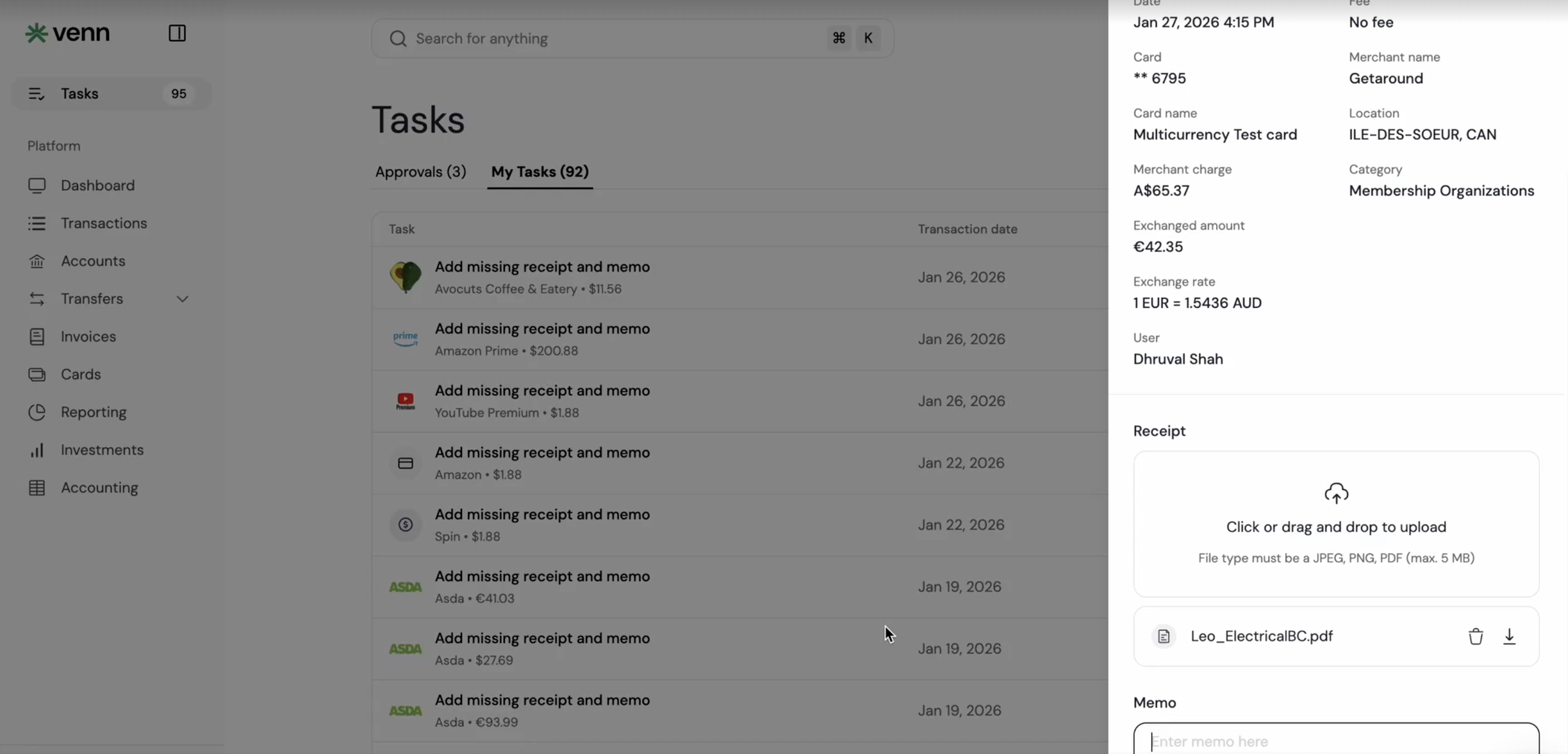
When you log into Venn, you’ll now see Tasks in the top left of the app.
Inside the My Tasks tab, you’ll find everything that needs your attention.
This tab will automatically populate with information your organization needs requiring your purchases. If a purchase crosses your company’s card policy threshold, you may be asked to add a receipt or memo explaining the transaction. You can upload the receipt directly in Tasks by clicking the "Auto Match Receipts" button on the top-right and Venn will automatically match it to the correct purchase using AI.
Admins, owners, and employees can all use My Tasks to stay on top of operational items like:
• Uploading missing receipts
• Adding memos to transactions
• Completing required purchase documentation
Once the task is done, it disappears from your list so your team can keep everything organized without extra effort.
My Approvals
For admins and owners, Tasks also includes a dedicated Approvals tab.
This is a centralized place to review and approve requests from your team without searching through different parts of the product.
From the Approvals tab, admins and owners can quickly review:
• Card requests from employees
• Card limit increase requests
• Transfer requests that require approval
Each request includes the key details you need to make a decision. Approve or decline directly from the dashboard and keep your team moving without delays.
Instead of approvals being scattered across the platform, everything is now visible in one place.

Get Started Today
Tasks is now live for all Venn customers.
Log into your Venn account and click Tasks in the top left to start using it today.
Whether you are uploading receipts, adding memos, or approving requests from your team, Tasks helps keep your finances organized and your operations running smoothly.
We are building Venn to be the financial operating system Canadian businesses actually deserve, and Tasks is another step toward making business banking simpler.
If your team is not using Venn yet and wants to see how reporting and the rest of the platform can help your business, sign up today.

This publication is provided for general information purposes and does not constitute legal, tax or other professional advice from Venn Software Inc or its subsidiaries and its affiliates, and it is not intended as a substitute for obtaining advice from a financial advisor or any other professional. We make no representations, warranties or guarantees, whether expressed or implied, that the content in the publication is accurate, complete or up to date.
This publication is provided for general information purposes only and does not constitute legal, tax, financial, or other professional advice from Venn Software Inc., its subsidiaries, or its affiliates, and is not a substitute for advice from a qualified professional. All comparisons and competitor information reflect publicly available information believed accurate as of March 17, 2026; features, pricing, rates, and terms referenced are subject to change and may differ at the time you read this. All product names, logos, and brands referenced are the property of their respective owners; their mention does not imply affiliation with or endorsement by Venn. Any comparative statements reflect Venn's views and are provided to help readers evaluate options. We make no representations, warranties, or guarantees, express or implied, that the content is accurate, complete, or up to date.

Venn is all-in-one business banking built for Canada
From free local CAD/USD accounts and team cards to the cheapest FX and global payments—Venn gives Canadian businesses everything they need to move money smarter. Join 15,000+ businesses today.
Frequently asked questions
Everything you need to know about the product and billing.
Join 15,000+ businesses banking with Venn today
Streamline your business banking and save on your spend and transfers today
No personal credit check or guarantee.
